
Last updated on
Oct 31, 2026
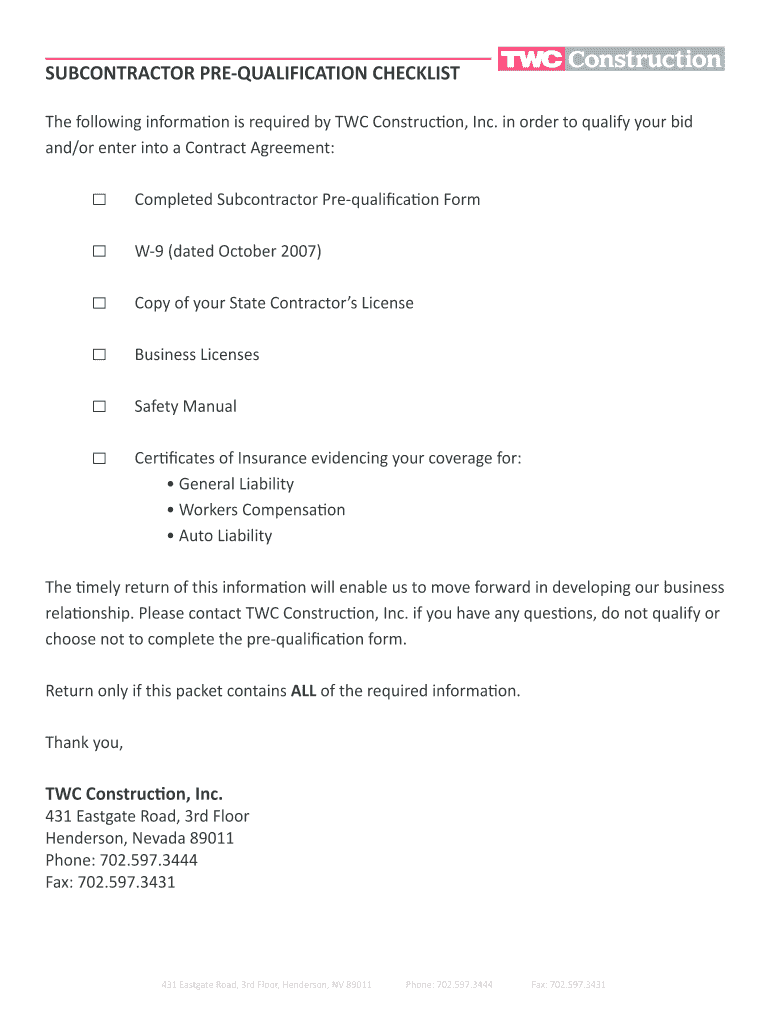
TWC Construction Subcontractor Pre-Qualification Checklist free printable template
pdfFiller is not affiliated with any government organization

Fill out
Complete the form online in a simple drag-and-drop editor.

eSign
Add your legally binding signature or send the form for signing.

Share
Share the form via a link, letting anyone fill it out from any device.

Export
Download, print, email, or move the form to your cloud storage.
Why pdfFiller is the best tool for your documents and forms


End-to-end document management
From editing and signing to collaboration and tracking, pdfFiller has everything you need to get your documents done quickly and efficiently.
Accessible from anywhere
pdfFiller is fully cloud-based. This means you can edit, sign, and share documents from anywhere using your computer, smartphone, or tablet.
Secure and compliant
pdfFiller lets you securely manage documents following global laws like ESIGN, CCPA, and GDPR. It's also HIPAA and SOC 2 compliant.
What is TWC Construction Subcontractor Pre-Qualification Checklist
The Subcontractor Pre-Qualification Form is a business document used by TWC Construction, Inc. to assess the qualifications of potential subcontractors before engaging in contracts.
pdfFiller scores top ratings on review platforms




Just getting started, but so far so good!
I am not tech savy but I was able to do what I needed.
Who needs TWC Construction Subcontractor Pre-Qualification Checklist?
Explore how professionals across industries use pdfFiller.

TWC Construction Subcontractor Pre-Qualification Checklist is needed by:
-
Construction Contractors seeking to work with TWC Construction, Inc.
-
Subcontractors applying for pre-qualification in Nevada.
-
Business owners in the construction industry.
-
Authorized signers responsible for signing the form.
-
Notaries assisting with the notarization of the form.
-
Companies needing to demonstrate compliance with licensing requirements.
Comprehensive Guide to TWC Construction Subcontractor Pre-Qualification Checklist
What is the Subcontractor Pre-Qualification Form?
The Subcontractor Pre-Qualification Form is a critical document used by TWC Construction, Inc. to evaluate potential subcontractors during the contracting process. Its significance lies in ensuring that interested parties meet the necessary qualifications to participate in construction projects in Nevada. This form is utilized by contractors and subcontractors within the context of TWC Construction’s operations and serves as a benchmark for quality and compliance.
This form encompasses key elements that help streamline business engagements and protect all stakeholders involved in the project. By utilizing the subcontractor pre-qualification form, TWC Construction can efficiently assess whether subcontractors possess the requisite skills, licenses, and compliance documentation.
Purpose and Benefits of the Subcontractor Pre-Qualification Form
The primary purpose of the subcontractor pre-qualification form is to ensure that subcontractors meet established standards for construction projects. By pre-qualifying subcontractors, TWC Construction protects its interests and improves project outcomes. This process not only fosters regulatory compliance but also mitigates risks associated with hiring non-qualified subcontractors.
By streamlining the contracting process, the form enhances operational efficiency. This leads to quicker project start times as subcontractor capabilities are established upfront. Benefits include:
-
Increased trust among stakeholders.
-
Enhanced project accountability.
-
Improved adherence to safety and compliance standards.
Key Features of the Subcontractor Pre-Qualification Form
The subcontractor pre-qualification form requires detailed company information, including specific fields that need meticulous attention. Significant features include the need for an authorized signer and a notary to validate the document’s authenticity. Moreover, applicants must provide safety manuals and proof of insurance coverage.
Additional aspects to note:
-
Mandatory completion of all relevant fields.
-
Notarization for the signing process.
Who Needs the Subcontractor Pre-Qualification Form?
This form is essential for various stakeholders, such as contractors, subcontractors, and construction firms aiming to work with TWC Construction, Inc. Businesses seeking contractual opportunities must fill out the subcontractor pre-qualification form to demonstrate their qualifications.
Not only does this form facilitate engagement with TWC Construction, but it also signals the contractor’s preparedness to adhere to industry standards and regulatory requirements.
How to Fill Out the Subcontractor Pre-Qualification Form Online (Step-by-Step)
Filling out the subcontractor pre-qualification form online is a straightforward process when utilizing pdfFiller. Follow this step-by-step guide:
-
Access the form via pdfFiller.
-
Complete all required fields diligently.
-
Attach necessary documents such as business licenses and insurance certificates.
-
Review for any incomplete sections or errors.
-
Sign and notarize the document as per requirements.
Required Documents and Supporting Materials
To successfully complete the subcontractor pre-qualification form, applicants must gather several essential documents. These include:
-
Current business licenses.
-
Insurance certificates with adequate coverage limits.
-
Safety manuals that outline compliance with industry safety standards.
Properly organizing these documents ahead of time can expedite the submission process and reduce the chances of errors.
How to Sign and Notarize the Subcontractor Pre-Qualification Form
Signing and notarizing the subcontractor pre-qualification form is a crucial step in the process. It's important to understand the differences between digital signatures and traditional wet signatures. TWC Construction accepts both methods, but each requires adherence to specific legal standards.
When using pdfFiller for electronic signatures, follow these general guidelines:
-
Ensure all signers are present as required.
-
Complete any necessary notarization steps per jurisdiction.
Submission Methods and What Happens Next
After completing the subcontractor pre-qualification form, applicants have several options for submission. The completed form, along with all supporting documents, can be submitted electronically via email or through the pdfFiller platform. Ensure that you follow TWC Construction’s designated submission channel to keep the process on track.
Upon submission, applicants can expect timelines for processing and follow-up procedures, which are vital for staying informed about the status of their application.
Common Mistakes and How to Avoid Them
Applicants often make frequent errors when filling out the subcontractor pre-qualification form. Common pitfalls include:
-
Neglecting to complete all relevant fields.
-
Failure to provide necessary documentation.
To avoid these errors, it's advisable to thoroughly review the completed form and ensure all entries are validated against the requirements before submission.
Get Started with pdfFiller Today!
Using pdfFiller to create, fill out, and manage your subcontractor pre-qualification form is both secure and user-friendly. The platform not only promotes a streamlined document process but also ensures sensitive information is handled with the highest level of security. Start utilizing pdfFiller today to simplify your form management experience!
How to fill out the TWC Construction Subcontractor Pre-Qualification Checklist
-
1.Access the Subcontractor Pre-Qualification Form through pdfFiller by searching for the document title in the site's search bar.
-
2.Once the form opens, familiarize yourself with the layout and the sections requiring completion, noting any blank fields and checkboxes.
-
3.Before filling in the form, gather all necessary documents, including your business licenses, insurance certificates, and safety manuals to ensure accurate and complete information.
-
4.Start entering your company information in the corresponding fields, ensuring accuracy as this data will be used to evaluate your qualifications.
-
5.Utilize pdfFiller’s tools to navigate the form smoothly, making sure to check each box for completion where applicable.
-
6.After filling out the form, carefully review all entered information for accuracy and completeness, as this will affect processing time.
-
7.Once everything is correctly filled in, sign the form digitally or print it if a handwritten signature is required.
-
8.Ensure that the document is notarized if required, obtaining appropriate notarization on the signature fields.
-
9.Save your completed form and, if necessary, download it in your preferred format or submit directly through pdfFiller's submission options.

What are the eligibility requirements for submitting the Subcontractor Pre-Qualification Form?
Applicants must demonstrate valid business licenses and insurance certificates in compliance with Nevada contractor regulations. It's crucial for subcontractors to ensure all required information and documentation are complete before submission.
Is there a deadline for submitting the pre-qualification form?
While there may not be a fixed deadline, it is advisable to submit the form well in advance of bidding opportunities or contract discussions to ensure timely processing and review of qualifications.
How can I submit the completed Subcontractor Pre-Qualification Form?
The completed form can be submitted directly through pdfFiller’s platform, allowing easy online submission. Alternatively, you may download and submit it via email or traditional mail depending on TWC Construction, Inc.'s preferences.
What supporting documents are required when filling out the form?
You will need to provide copies of business licenses, insurance certificates, and safety manuals. Ensure that all documents are up-to-date and properly organized to accompany your application.
What are common mistakes to avoid when completing the form?
Common mistakes include omitting required information, failing to notarize the form when required, and submitting incorrect documentation. Always double-check for completeness and accuracy before submission.
How long does it take to process the Subcontractor Pre-Qualification Form?
Processing times can vary, but typically it may take several business days to weeks based on the volume of applications and the thoroughness of your submission. Staying in contact with TWC Construction, Inc. can provide updates.
What should I do if I have questions during the form-filling process?
If you encounter any issues or have questions while completing the form, it's recommended to reach out directly to TWC Construction, Inc. for guidance or consult their website for additional resources.
Related Content
Related Forms





Related Catalogs
Get the latest insights from our blog


If you believe that this page should be taken down, please follow our DMCA take down process
here
.
This form may include fields for payment information. Data entered in these fields is not covered by PCI DSS compliance.